
Use cases
Teaching and case conferences with a shared case link.
Share Case (Supporter and Pro) turns the series you have loaded into a link. The person who opens it sees the case in a browser, with no account and no install.
How Share Case works
Before anything is sent, Share Case shows a mandatory preview. It uploads a de-identified copy, and only what you have reviewed and confirmed in that step goes anywhere.
You can protect the link with a password and give it an expiry. You can also revoke it early from the dashboard.
A single share can hold up to 5 studies, and you give each study a label. The recipient sees each study listed under the label you chose. The link works the same on a workstation and on a phone.
How long links last
| Supporter | Pro | |
|---|---|---|
| Shares | 3 share slots a week | 20 share slots a week |
| Size | 1.5 GB maximum | Up to 3 GB per share |
| Link valid for | Up to 3 days | Up to 7 days |
A slot is 500 MB, and each share uses one slot per started 500 MB, so a 1.2 GB case uses all three of a Supporter's slots.
The key stays in the link
A share link looks like https://noustadicomviewer.com/share/<id>#k=<key>. The key is the part after the #. The browser reads it, and it is never sent to the server.
Burned-in text
Some images, such as ultrasound screen captures, carry text burned into the pixels. Dropping identifiers from the file does not remove it. Share Case flags series likely to contain such text.
The Redact text panel looks for text on your device and uploads nothing. It lets you hide what you choose. Detection can miss text, so check the preview. It reduces what the recipient sees without guaranteeing the copy is fully de-identified.
In a case conference
Send the link ahead of the meeting. Anyone attending opens it in a browser on their own machine.
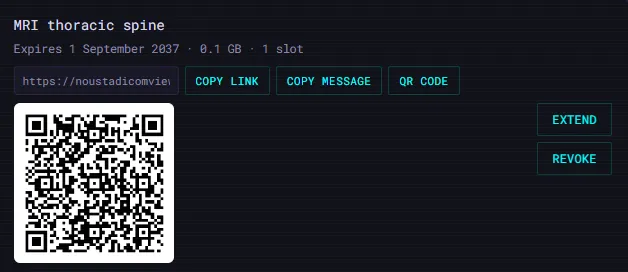
The dashboard shows a QR code for a shared case, along with its link, expiry and controls to extend or revoke it.
For a class
Pro is described on the Supporter page as for hosting a whole class, with more concurrent shares, larger cases and longer-lived links.
Exam/Class Mode is a separate feature. It runs locally and locks Share Case for the session, so the two are used for different jobs.
Related
It is not a certified medical device and is not intended for primary diagnostic use, and it does not replace a calibrated diagnostic workstation.